A UI/UX Design for a business that provides LinkedIn career clinic and review services.
CLIENT
Jago LinkedIn
ROLE
UI/UX Designer
SERVICE
Mobile App Design
Project Details
Problem
I was asked to create a mobile app for Jago LinkedIn that focuses on user engagement and has unique features. They also wanted the mobile app to complement their website, but since the company turned out to be fake, they did not have a website either, so I just followed the design style from their Instagram account.
Goals
Create a mobile app design that can maximalize user engagement.
Create unique features that match with Jago LinkedIn brand as a LinkedIn Career Clinic.
Role & Responsibility
UI/UX Designer. I did end-to-end design processes from research to creating high-fidelity prototypes.
Constraints
The information about the company is not quite enough, they just tasked me to create a mobile app design with the goal listed above. Other than that, they didn’t give any other brief or requirements so I had to explore it myself like for the colour scheme that I try to match with their Instagram posts.
The timeline for this task is quite strict like just 3 days so I don’t have enough time to do usability testing to validate my design.
Design Process
After understanding the task, I conducted research first to gain feedback regarding how people use LinkedIn and then tried to ideate solutions from it.
Research
Research is an important phase that I did before starting a project, be it as simple as looking for relevant data on Google, or deep with user interviews and surveys. For this task, here is my research plan:
Research Objective
Find out if people are maximizing LinkedIn’s potential for personal branding, networking, and career development.
Find out the best ways to make it easier for people to maximize LinkedIn’s potential.
Target Participants
5 people
Male/female
Age 17-35 years (Average age of students and job seekers)
Students/job seekers (People who are likely to use LinkedIn)
Have a smartphone (Because this project is for a mobile app)
Have a LinkedIn account
Methodology
Qualitative surveys using Google Forms. I use surveys because it’s faster to gain data rather than scheduling time for user interviews. The data I collected is qualitative because I want to know how people are using their LinkedIn.
Questions
Since when have you been using LinkedIn?
How often do you use LinkedIn?
What do you usually use LinkedIn for?
Do you believe that LinkedIn is effective in building personal branding?
If yes, please tell us how you use LinkedIn to improve your branding. If not, what might be the challenges or pitfalls of using LinkedIn for personal branding?
Do you often socialize on LinkedIn, such as participating in groups or interacting with other people's posts?
How do you usually expand your professional network on LinkedIn?
Do you feel that LinkedIn helps you build valuable professional relationships?
Have you ever gotten a career opportunity or project through LinkedIn?
What might be the difficulties or obstacles in maximizing the potential of LinkedIn?
Are there any features or aspects of LinkedIn that are difficult to understand or use?
Are you active in updating your LinkedIn profile with your latest achievements and new skills?
How do you usually learn or search for new information related to using LinkedIn?
If there is an application/website platform that can help you maximize the potential of LinkedIn, what is your picture of the platform such as its features or what would attract you?
Research Results
Here is what I got from the surveys:
5/5 respondents are still students, and 1/5 respondent is a student & job seeker.
3/5 respondents have used LinkedIn for 1-2 years, and 2/5 respondents have used LinkedIn for more than 2 years.
The top 3 things they usually do on LinkedIn are viewing professional content, searching for job information, and posting achievements.
Regarding personal branding, 1 respondent did not know how to do personal branding. 4/5 respondents did personal branding by adding experience history and portfolio.
Regarding networking, 3/5 respondents are connected with people in the same field/they like. 2 respondents are connected only with contacts and friends.
The benefits they feel from LinkedIn is contains a lot of useful content, easy to connect with many people professionally.
All respondents have never received a job or project offer from LinkedIn.
Some of the obstacles they experience are being less active, not knowing how to use LinkedIn, having no time to be active on social media, not having much experience, profile that is not attractive to HR.
Regarding difficulties with features, 2/5 of respondents still have difficulty and do not understand the overall features of LinkedIn, and 1/5 of respondents are confused about finding features to view posts they have saved.
Regarding social activity, 4/5 respondents rarely or only occasionally actively interact on LinkedIn.
Regarding where people usually learn information about LinkedIn, some answered friends/closest people and self-taught through social media & YouTube.
The suggestions they gave to make it easier to get the most out of LinkedIn; There needs to be a discussion forum for beginners, there needs to be LinkedIn guidance, there needs to be information that makes it easy for new users to add achievements, some kind of easy-to-understand guide.
Research Conclusion
Most respondents still do not understand the use of LinkedIn in maximizing personal branding and networking.
All respondents understand that LinkedIn can be beneficial for their careers but still have difficulty in building their profiles and personal branding.
The majority of obstacles experienced come from a lack of knowledge in using LinkedIn and creating an attractive LinkedIn profile.
Define
After gaining data from research, I’m trying to understand what are the problems people experience and try to put myself in their shoes. This is done through empathy map, user persona, and mapping user journey.
Empathy Map

An empathy map is used to map our perspective as the user or the person experiencing the problem, here we can map what they think, feel, hear, see, say, and do. I made this empathy map that matches the data from the research phase. Here, we can see that the person already has awareness about how they should advance their career, they know about LinkedIn too from other sources and already thinking about is their preparation enough.
User Persona
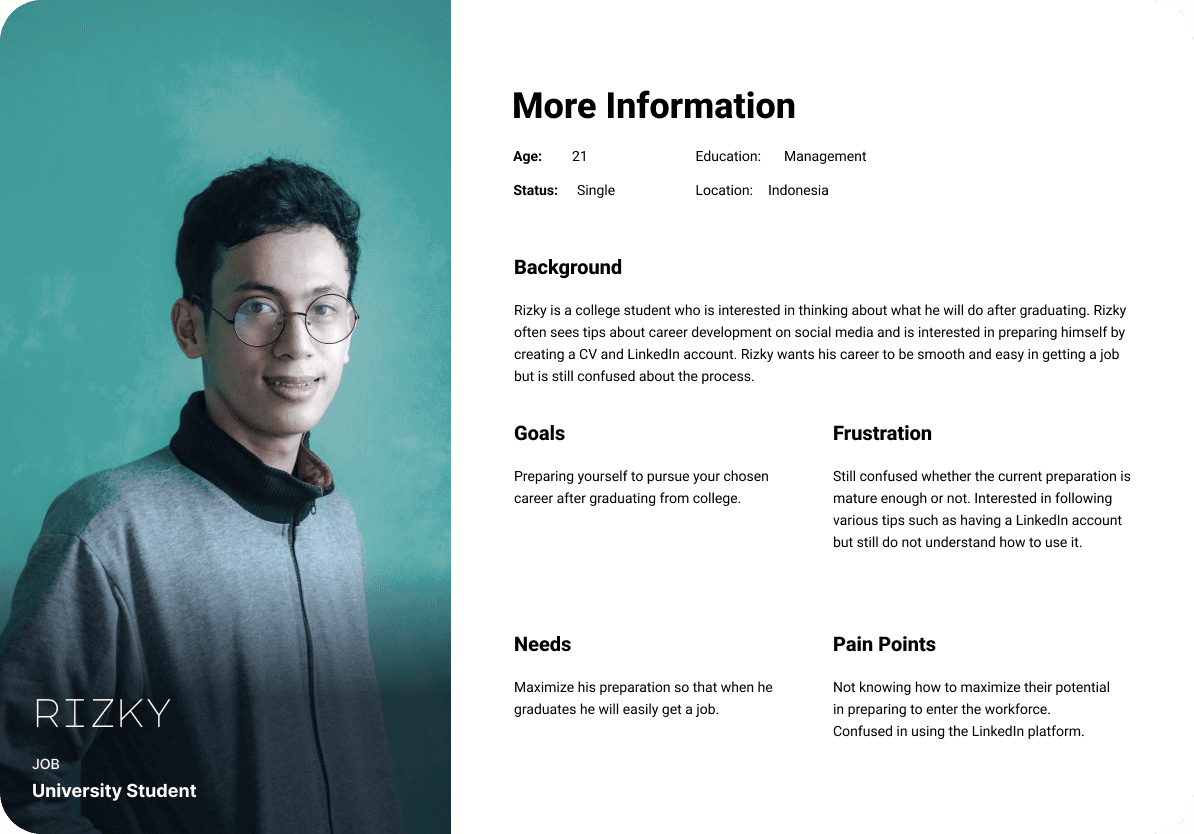
To better visualize the problem that people experiencing, I created a user persona. This is the ideal person who will be using the Jago LinkedIn mobile app and have the typical problem based on the research results.
User Journey Map
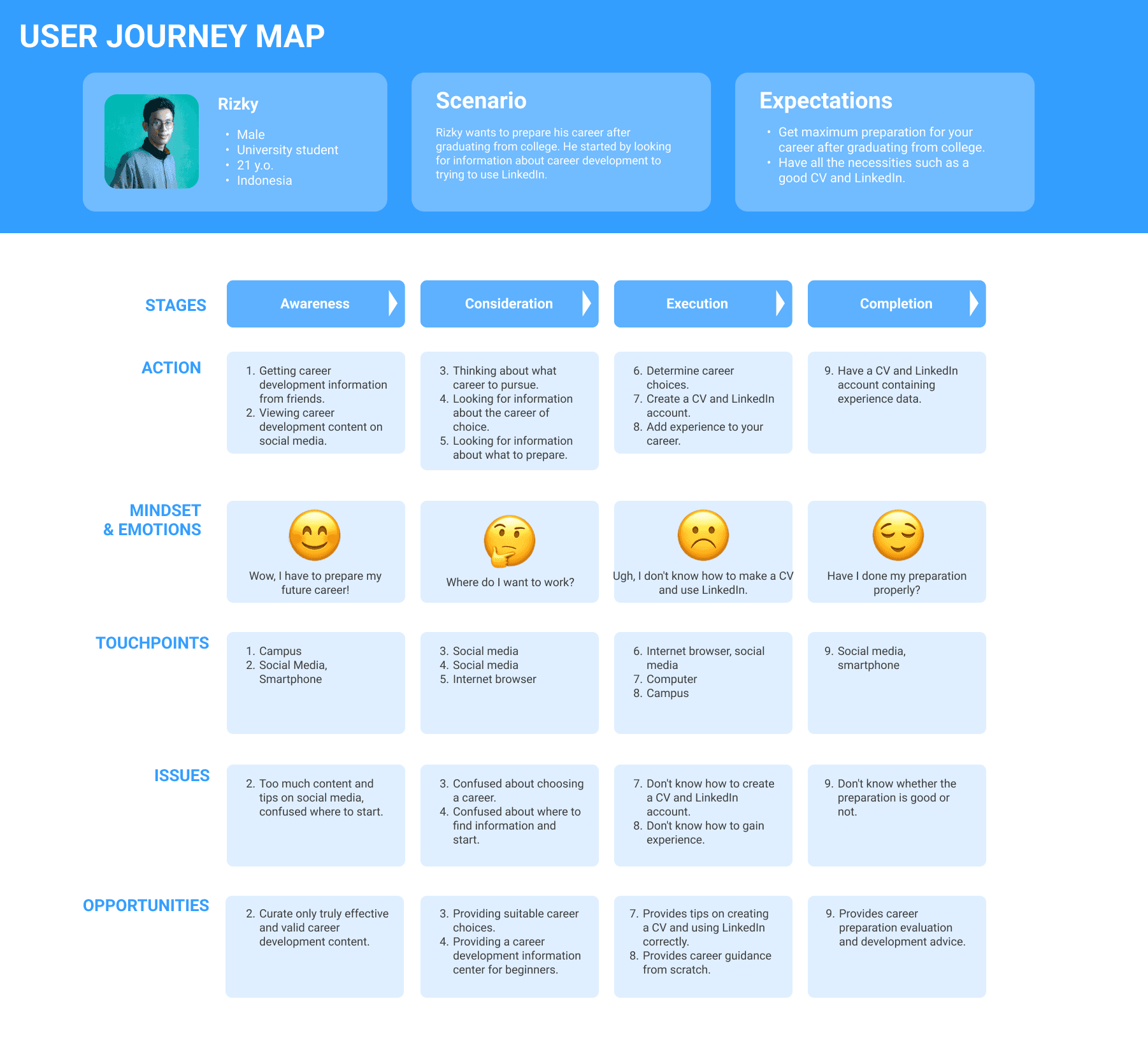
A user journey map is also created to understand how a regular day works for the ideal user. Here, the user is aware of career development information from various sources like friends and social media. Then, they think about their career plan and look for more information until they determine their choice and try to create a CV and get experience. There are also some issues that the user faces along with room for opportunity for improvement that can be solved using Jago LinkedIn services.
Most of the things that I did in the Define phase were to understand the user’s perspective and gain deeper insight into the root cause of the problem. I will organise their problem into affinity mapping in the ideation phase.
Ideate
After getting data and establishing user perspective, here I try to find solutions to people's problems through affinity mapping, generating ideas, choosing and prioritizing ideas, and also sketching the concept for the solutions as a mobile app feature.
Pain Points
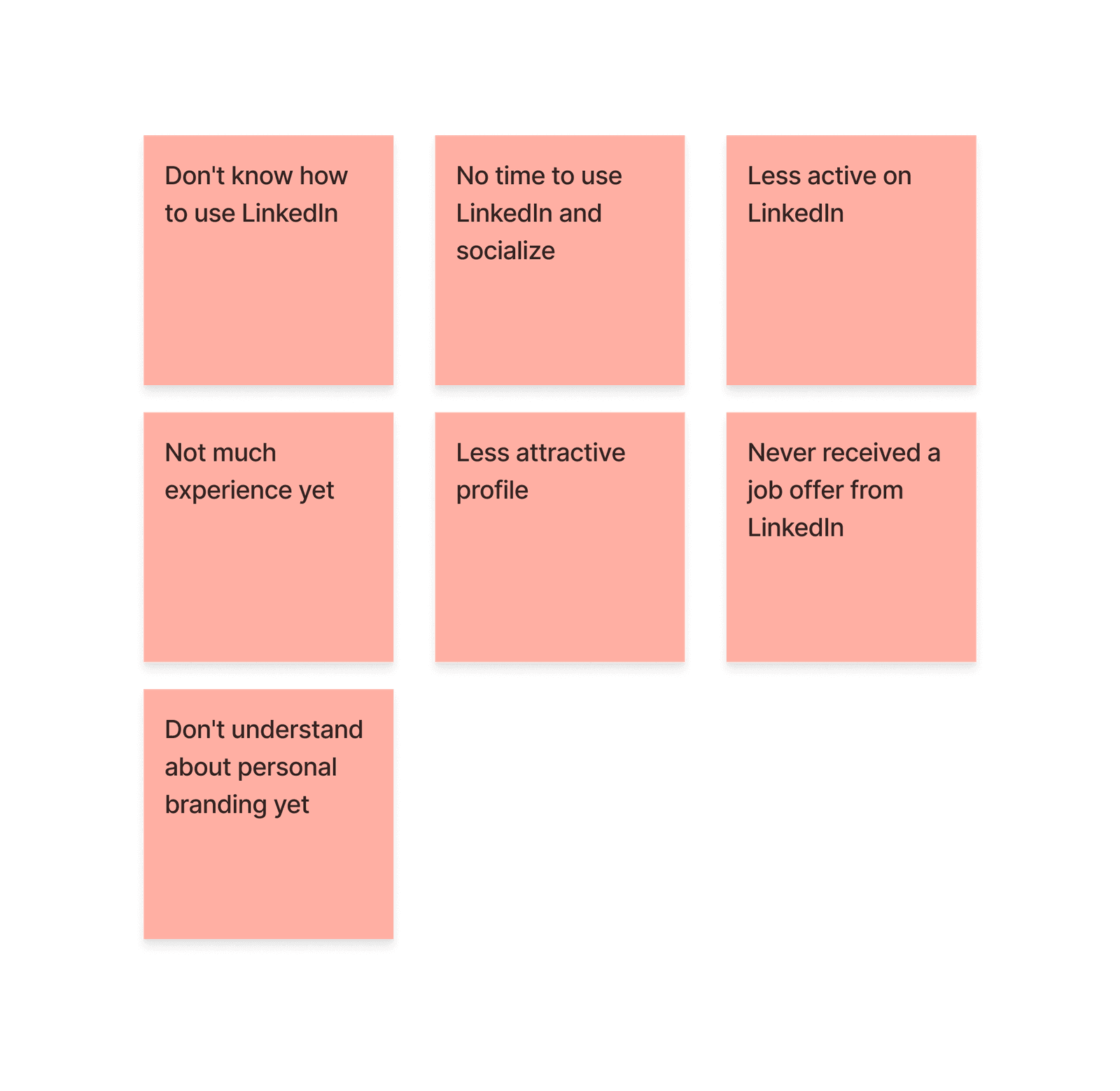
Listed above are the pain points or the things people struggle with based on research data. The problems that people experience when using LinkedIn vary widely, from a lack of knowledge about what LinkedIn is and its uses, not having time to update and socialize, to difficulties in building an attractive profile that can attract opportunities.
How Might We
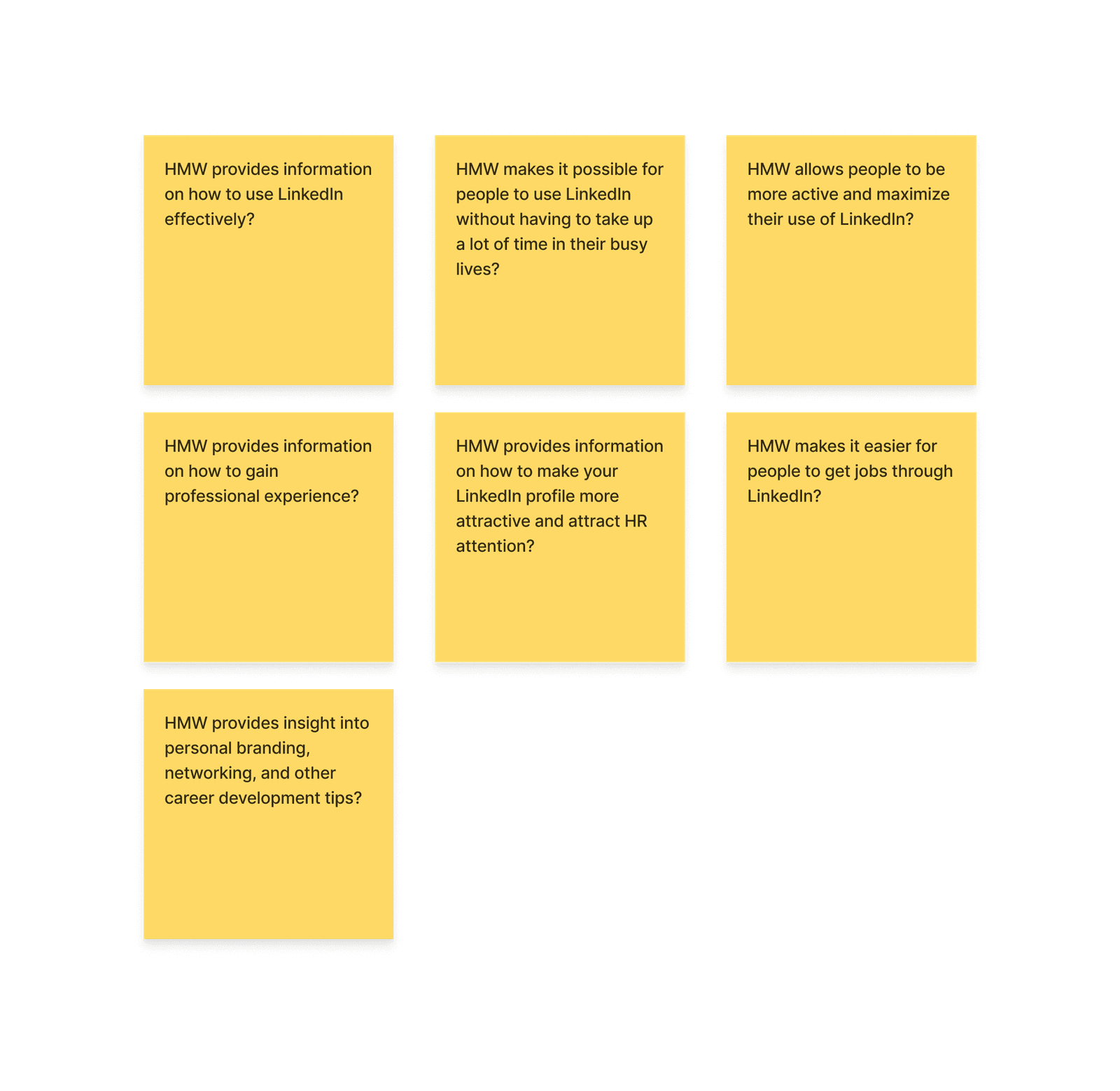
To find a solution to the problem, I used the How Might We method to change previous pain points into questions that I could ask to generate solution ideas.
Ideation
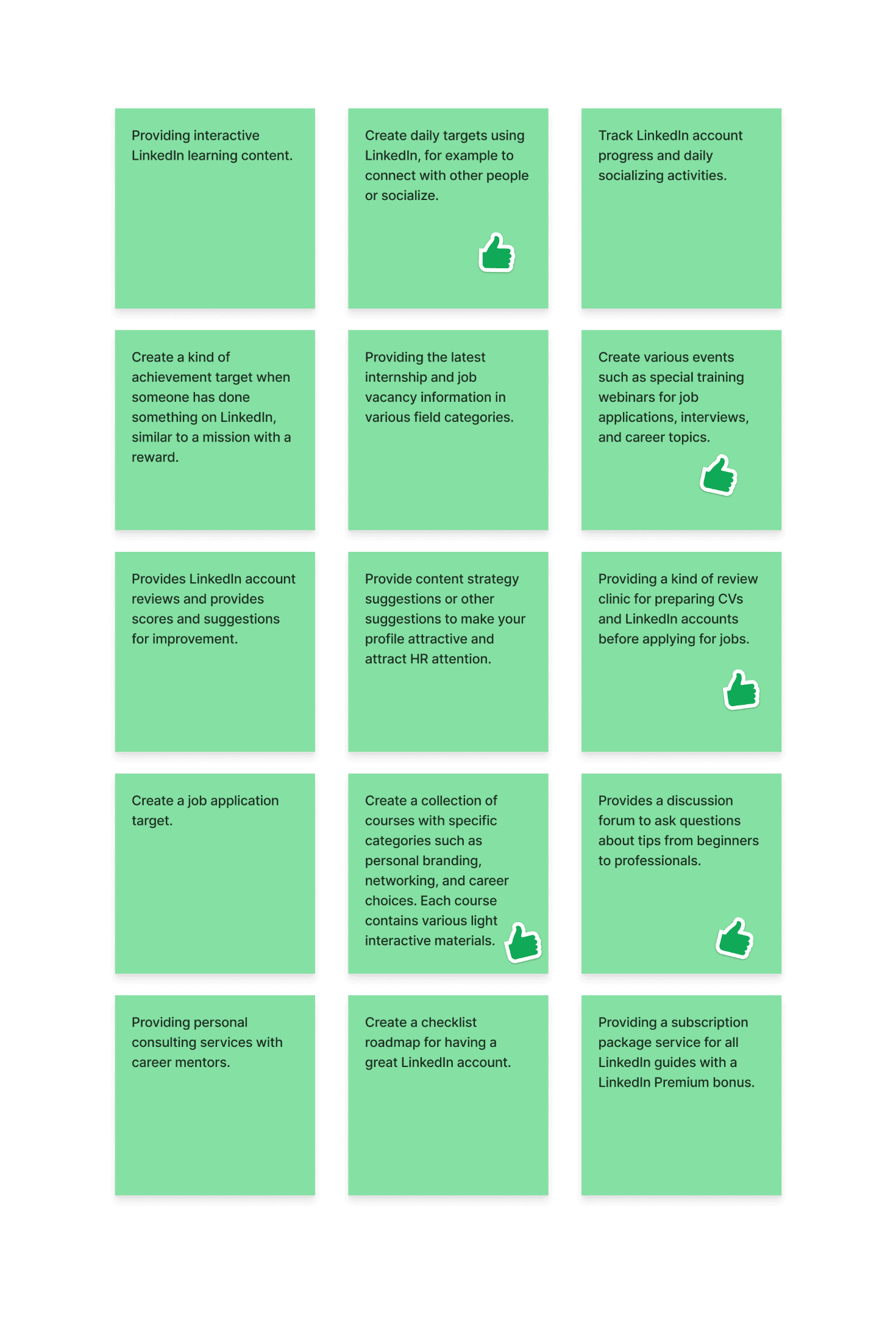
After creating the HMW questions, I started to ideate many possible solutions. Like creating a daily checklist target for LinkedIn, providing LinkedIn account review and consultation, creating job application targets for job seekers, and more.
All ideas are unique and I like to explore various solutions to solve problems, but, we can’t afford to use all ideas so we need to select some of the best and try to prioritize them. Other ideas that are not used yet at this stage still can be beneficial for future updates.
From various ideas that I generated, I chose five which are:
Create a daily target for using LinkedIn
Create exciting events for users to learn more about LinkedIn
Providing profile review service and consultation
Created courses with many topics regarding LinkedIn and personal branding
Providing a forum discussion media so users can talk and discuss with others
Prioritization Ideas
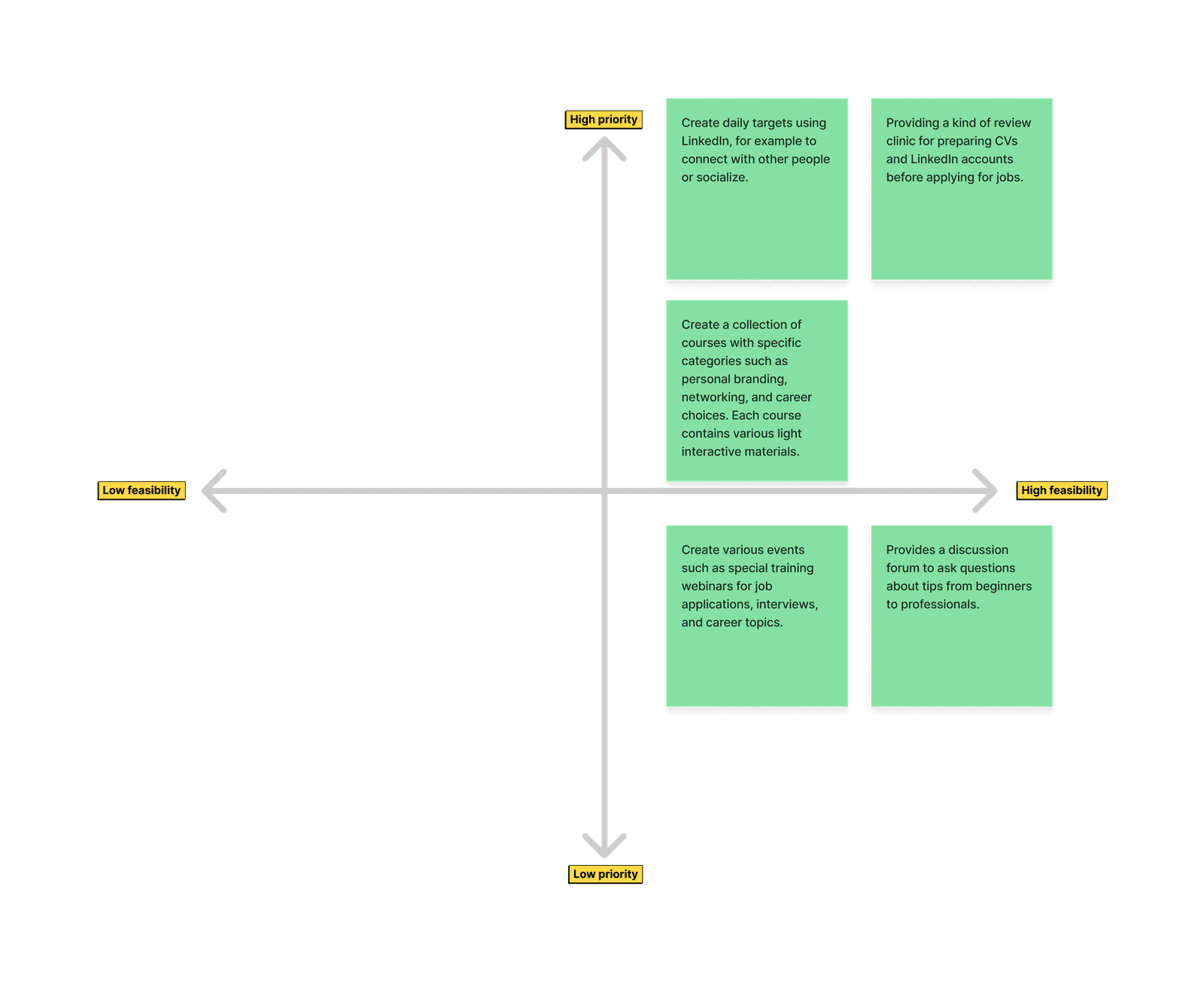
After choosing five of the best, I prioritize it using this prioritization matrix based on priority and feasibility level. It turns out that all my ideas are quite feasible to create to all of them can be proceeded as features for the app.
Feature List
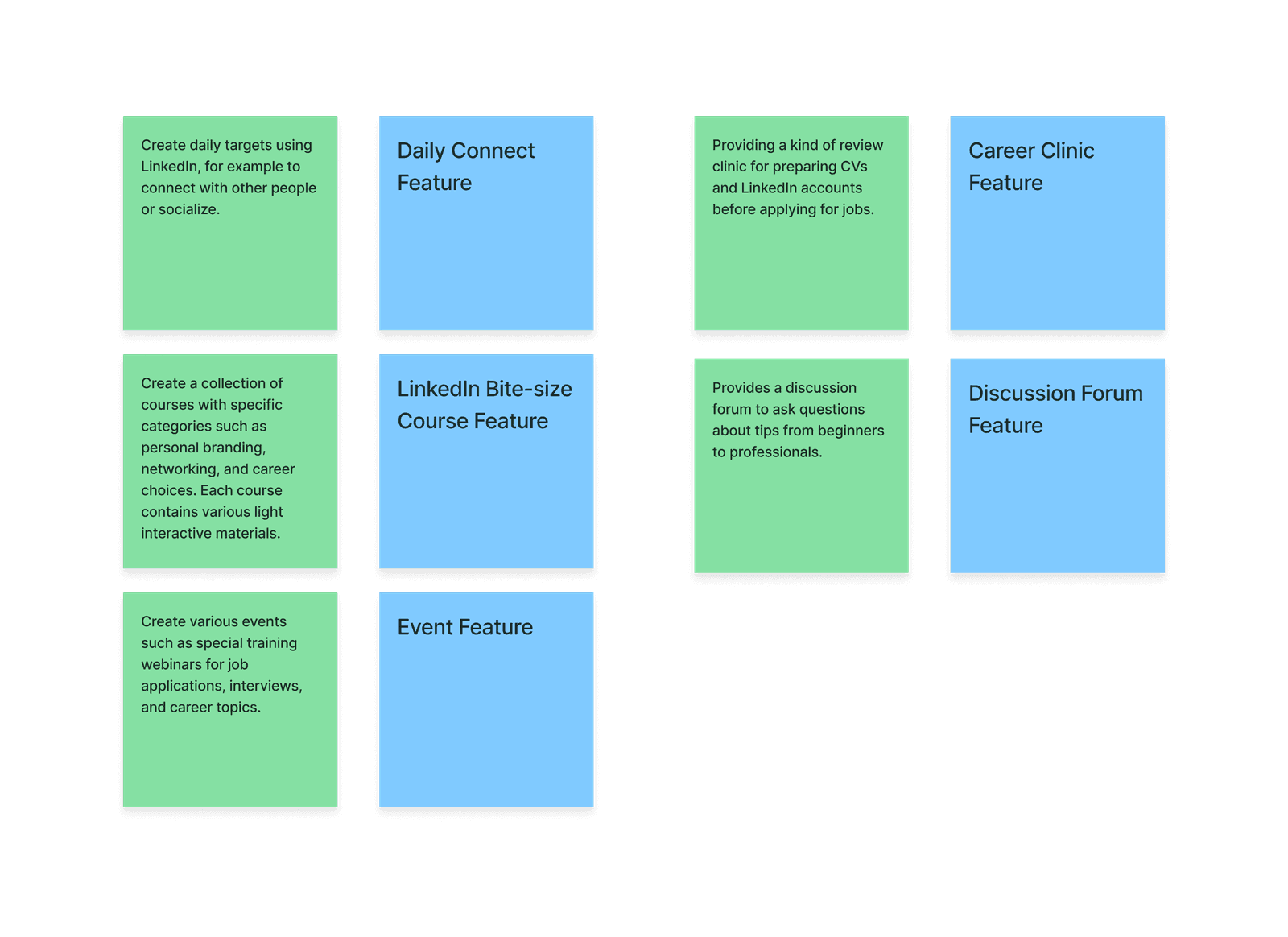
All the ideas that are made through prioritization will be a feature on the mobile app. Here I convert those ideas into features which are; the Daily Connect feature, LinkedIn Bite-Size Course feature, Event feature, Career Clinic feature, and Discussion Forum feature.
I considered various aspects to finalize this feature list and I thought that this could work to solve user problems. These features will also align with Jago LinkedIn company which provides career clinics and consultation services.
User Flow
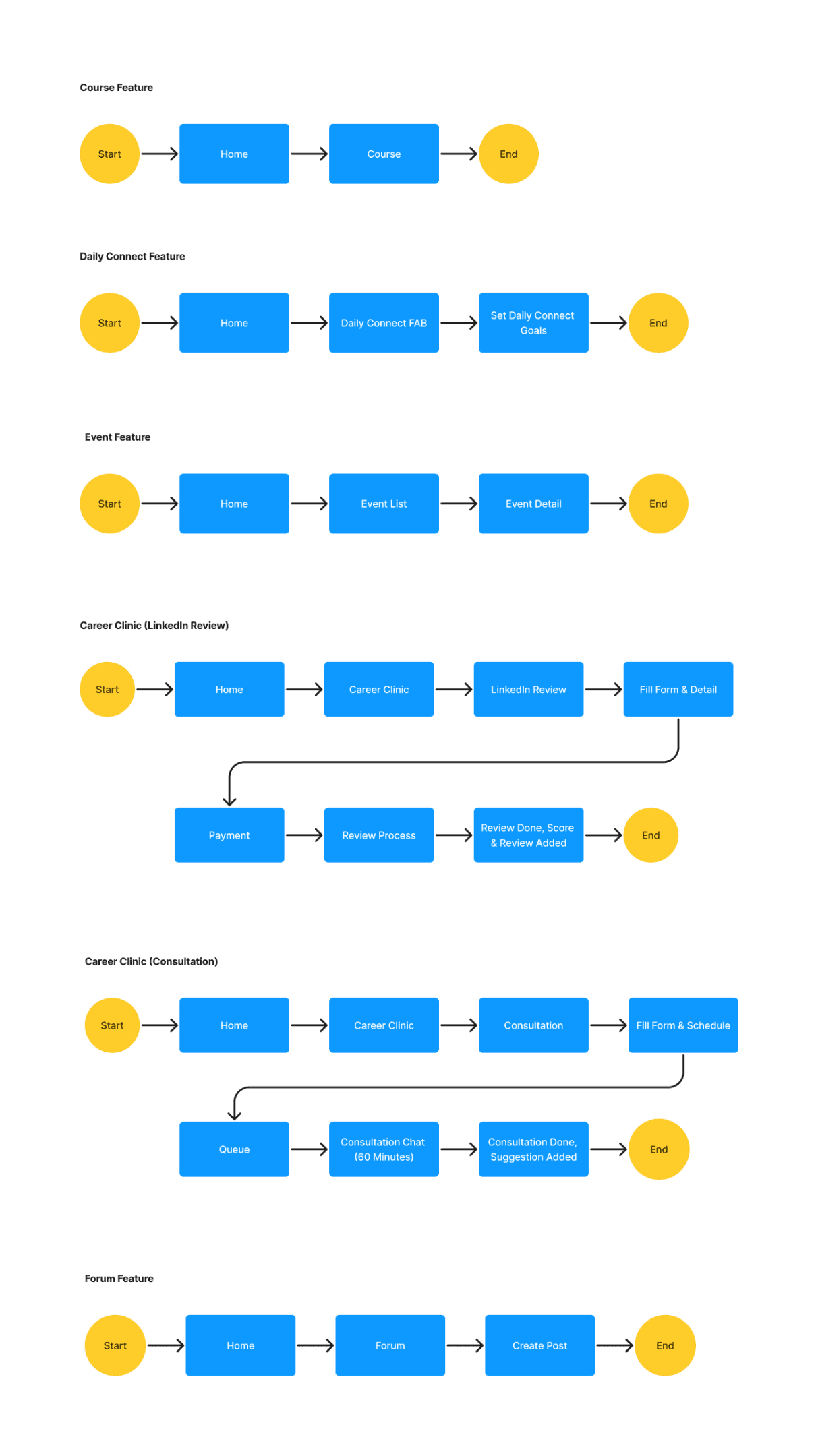
After all the features were defined, I created a user flow for each feature to map how the user should access those features on the app.
Sketch
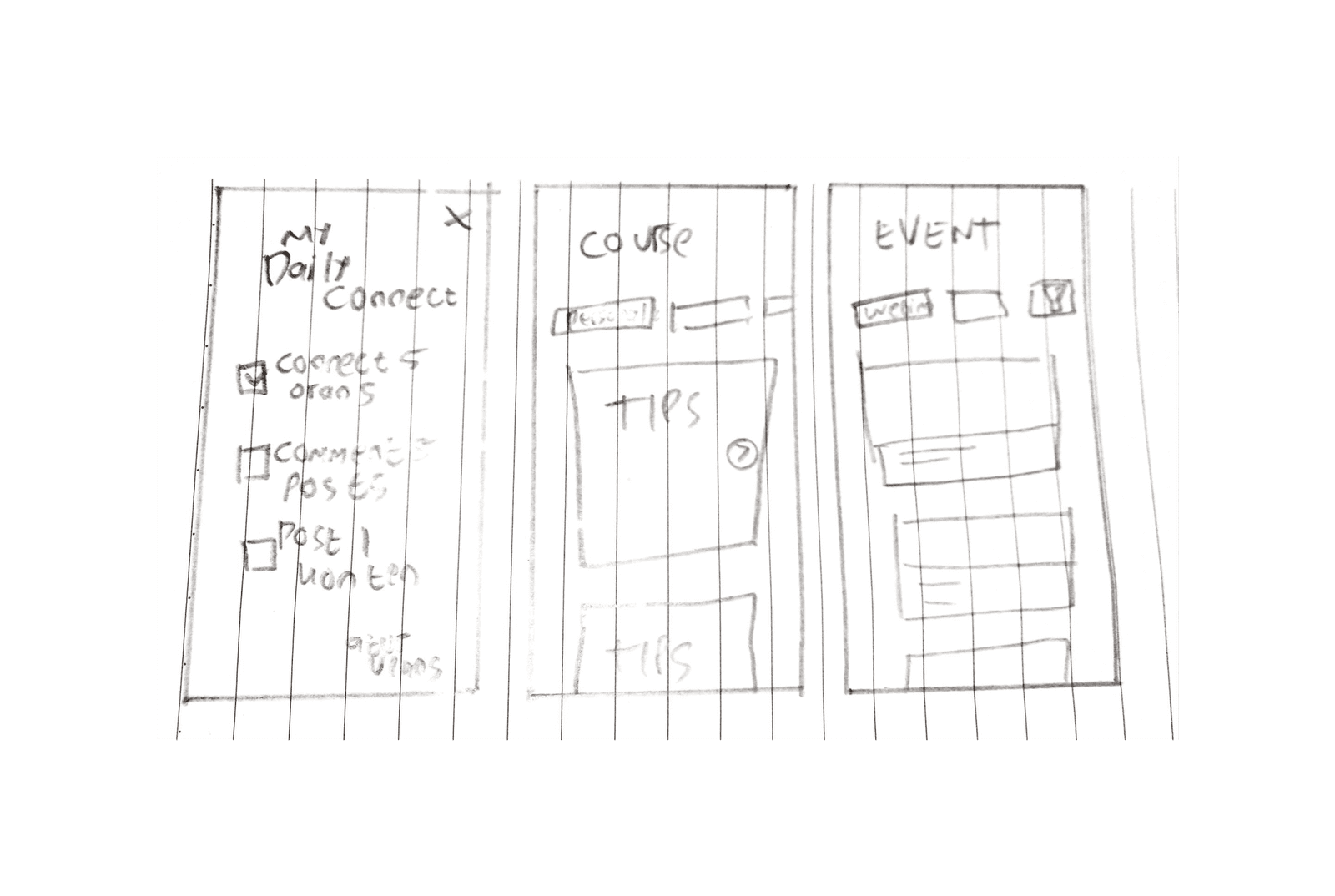
I created some rough sketches to visualize the layout for each feature. This is a very rough one that will be improved as a low-fidelity wireframe.
Wireframe
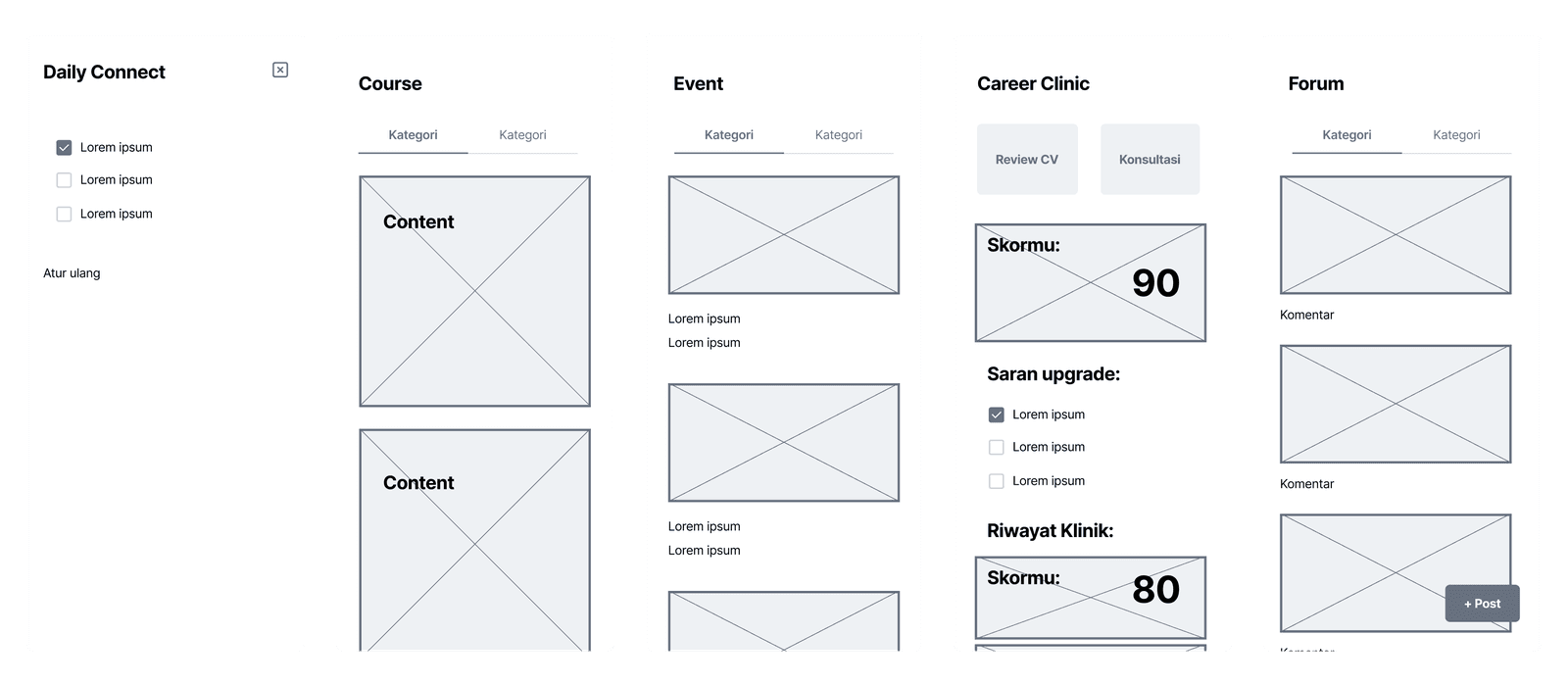
This is the wireframe for several pages that I will design. I only design the key feature pages and do not include login flow, profile page, settings, and others beside the key pages. From this wireframe, I already mapped the layout that I will use for the high-fidelity design.
Final Design
After getting fixed with the solution ideas, user flow, sketches, and wireframe, I entered the final design phase where I designed the high-fidelity prototypes of the mobile app.
Style Guide
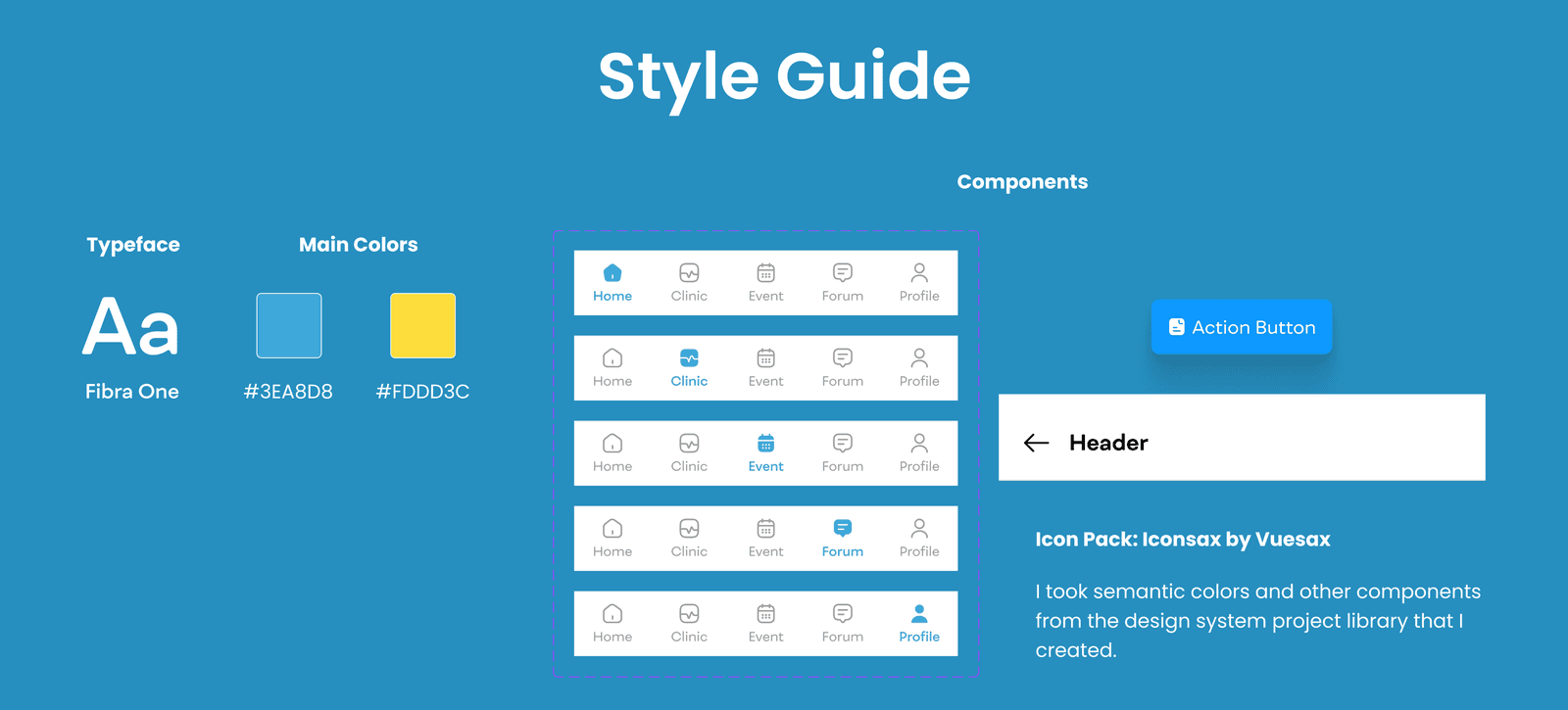
The design style guide is quite simple because I just need two main colours and a few simple components since the tasks don’t require creating complex interactions or prototypes, just the main design. For the component, I created a navigation bar, button, and header since those are the reusable ones on the design. Other than that, I used a few components from my previous project so I didn’t create a new one.
For the typeface, I use Fibra One. It’s a very artistic modern sans font that I like and it goes well with the interface design. For the main colours, I used blue and yellow since those are the colour schemes that I got from Jago LinkedIn’s Instagram post, so I used a brighter shade to bring an exciting feel.
Hi-Fi Design
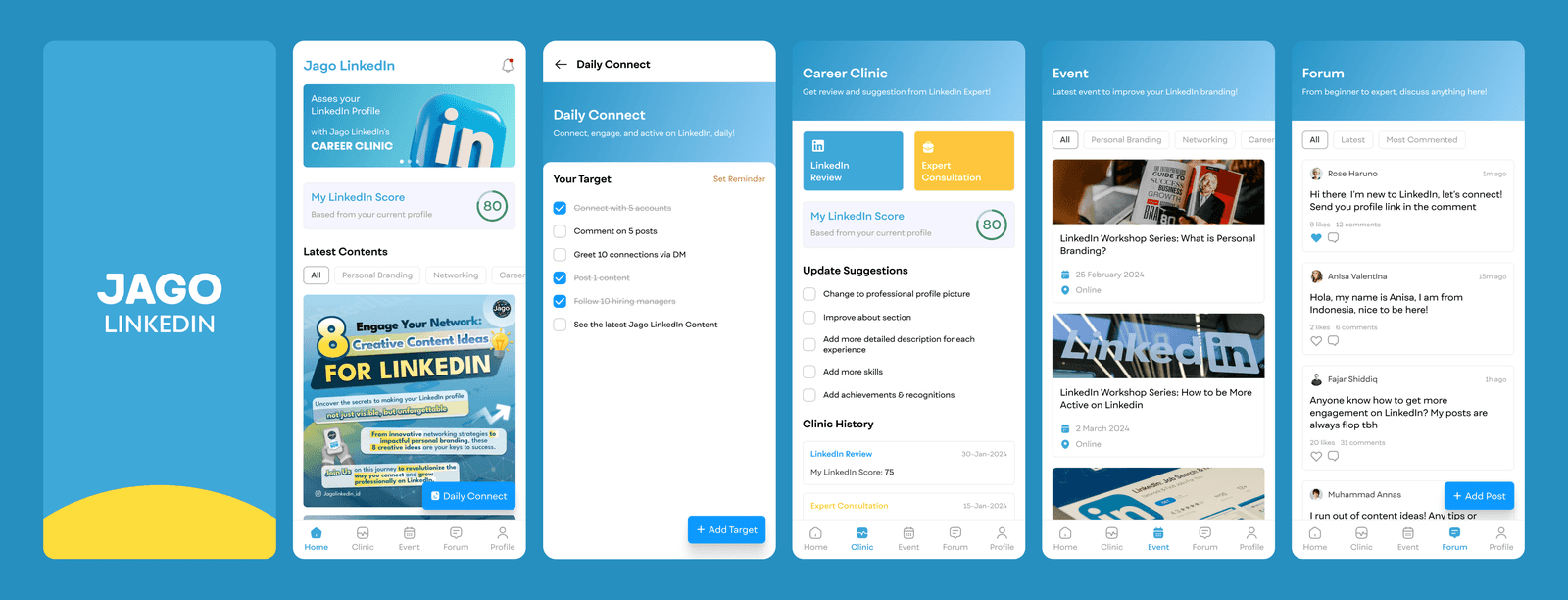
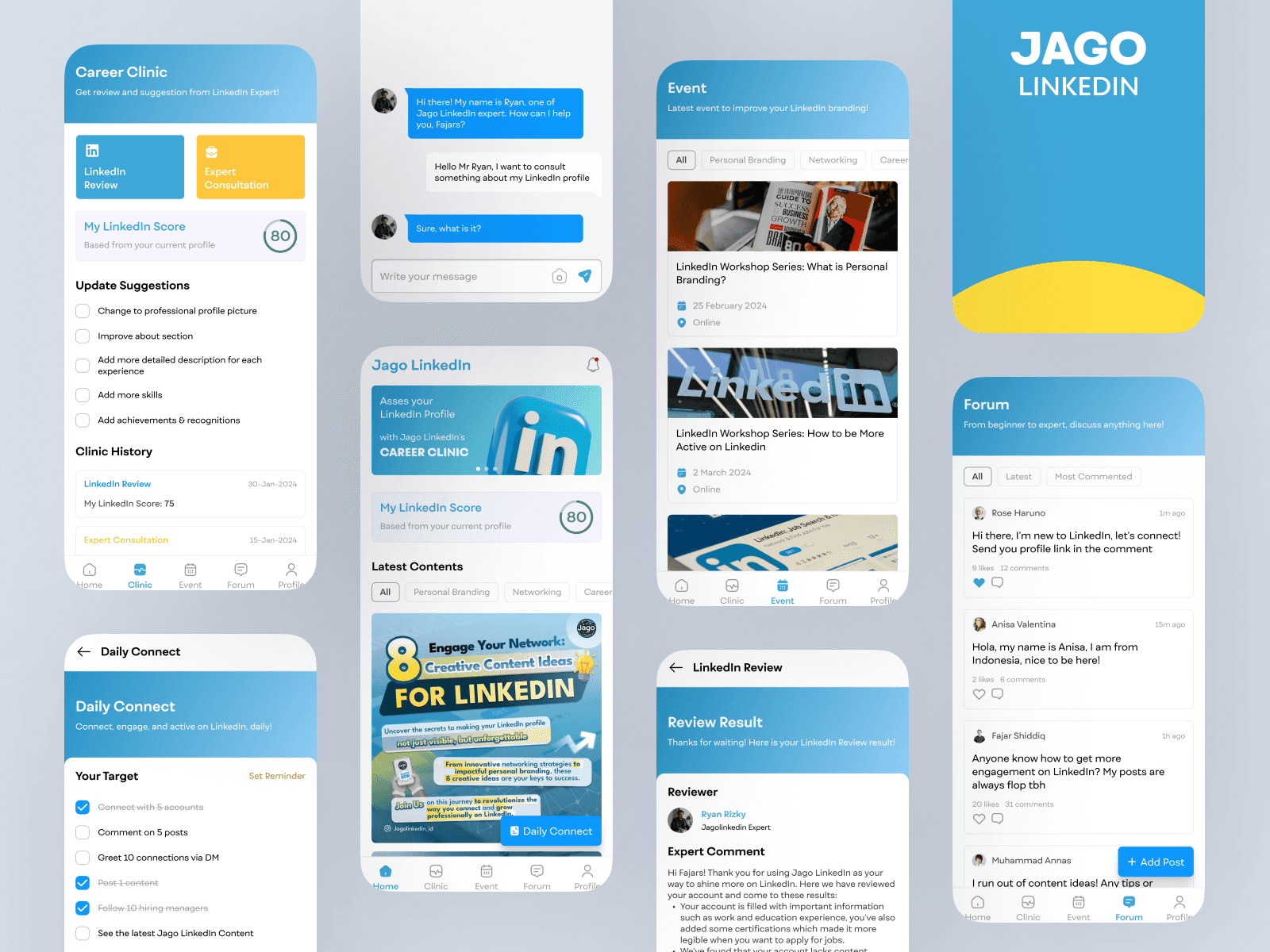
This is the hi-fi design that I created. I only create some key pages based on the feature selected before. The interface uses a clean white theme with blue and yellow as the main brand colours. Here I will explain each of the screens I designed.
Splash Screen

In this splash screen design, I focused on the Jago LinkedIn branding along with the addition of bright-coloured elements that depict a sense of enthusiasm when entering the application.
I did not use the existing Jago LinkedIn logo because after I tried it, it turned out to be less suitable compared to my making a simpler text logo. Even so, it is also possible that the existing Jago LinkedIn logo can be included on this page.
Due to time constraints, I only made a splash screen without a login or onboarding flow. I focused on designing the main features according to my ideas.
The main colours, namely blue and yellow, I took from the colour scheme on Jago LinkedIn’s Instagram posts where I focused on bright colours to give a "fun" impression.
Home Page

I designed the home page display with a minimalist theme to make it easier for users to access the existing features. On the home page, there is a header containing the application name (Jago LinkedIn) and notification features. Because Jago LinkedIn is still relatively new, I added the application name in the header to improve its branding.
There is also an ad banner to promote Jagolinkedin services or content. Next, there is the My LinkedIn Score section, in this section when the user first creates an account it should be empty, this is a picture of the display when there is already a user LinkedIn score. To get a LinkedIn score, users need to do a LinkedIn Review on the Career Clinic feature.
For the course feature, I chose to combine it on the home page to easily increase user engagement. Users can see various Jagolinkedin content (bite-size courses) with one swipe here.
In the lower right corner of the home page, there is a floating action button to enter the Daily Connect feature. Its placement as an FAB was chosen because this feature will be a feature that users often use every day.
Daily Connect

This feature is like a to-do list for LinkedIn. Users can add their daily targets and set reminders for push notifications.
The reason for creating this feature is to form user habits in using LinkedIn. Connecting with other people or making posts every day, is expected to become a good habit to improve user personal branding.
Here Jago LinkedIn facilitates this by creating daily user targets along with push notification reminders.
I only made the initial appearance as an illustration due to time constraints.
The use of blue and its gradation here I set as a style guide for the entire application to be visually consistent.
Events

This feature is designed to facilitate users who want to attend events such as training or webinar series. Here Jago LinkedIn also has the opportunity to further improve its branding because if many users are interested in the existing event, then they will also be interested in Jagolinkedin.
The design of this page displays category filters and cards for each existing event. When the card is clicked, it will go to the event details where users can register and access the event link.
I haven't had time to design this feature in more depth due to time constraints, however, the big picture is similar to when we use an event ticket booking platform (loket.com, tiket.com).
Forum

The forum feature was created to facilitate users in asking questions about LinkedIn, personal branding, etc. to fellow users who are members of the Jagolinkedin application. This feature is similar to a community for sharing and asking questions.
This feature system is like a social media post where users can post something and other users can comment. The reason it was made like this is so that each user can have their own thread and the discussion can be more focused.
When writing this explanation, I thought about also adding a search feature here so that users can search for certain existing posts. Maybe this search feature can be an addition for further development due to time constraints.
I also only made an initial description and have not had time to explore this feature further. Even so, the description is similar to when we make posts on social media (Facebook, X, LinkedIn).
Career Clinic

The beginning of my creating this feature was because I read that Jago LinkedIn is a LinkedIn Branding Clinic. I thought of the idea to realize this with this Career Clinic feature. This feature was born from the problem of users who do not know whether their LinkedIn profile is good or not. Therefore, here I provide two main services; LinkedIn Review and Expert Consultation.
The two services can be accessed from the card menu at the top of the screen. Where here there is also My LinkedIn Score to remind users how good their LinkedIn account is.
There are Update Suggestions where users can make certain updates to increase their LinkedIn score. These suggestions are obtained after the user uses the LinkedIn Review or Expert Consultation service. If they have never done so, then Update Suggestions will not appear.
At the very bottom, there is a history of using the Career Clinic service where users can see the history of comments or previous review results.
LinkedIn Review
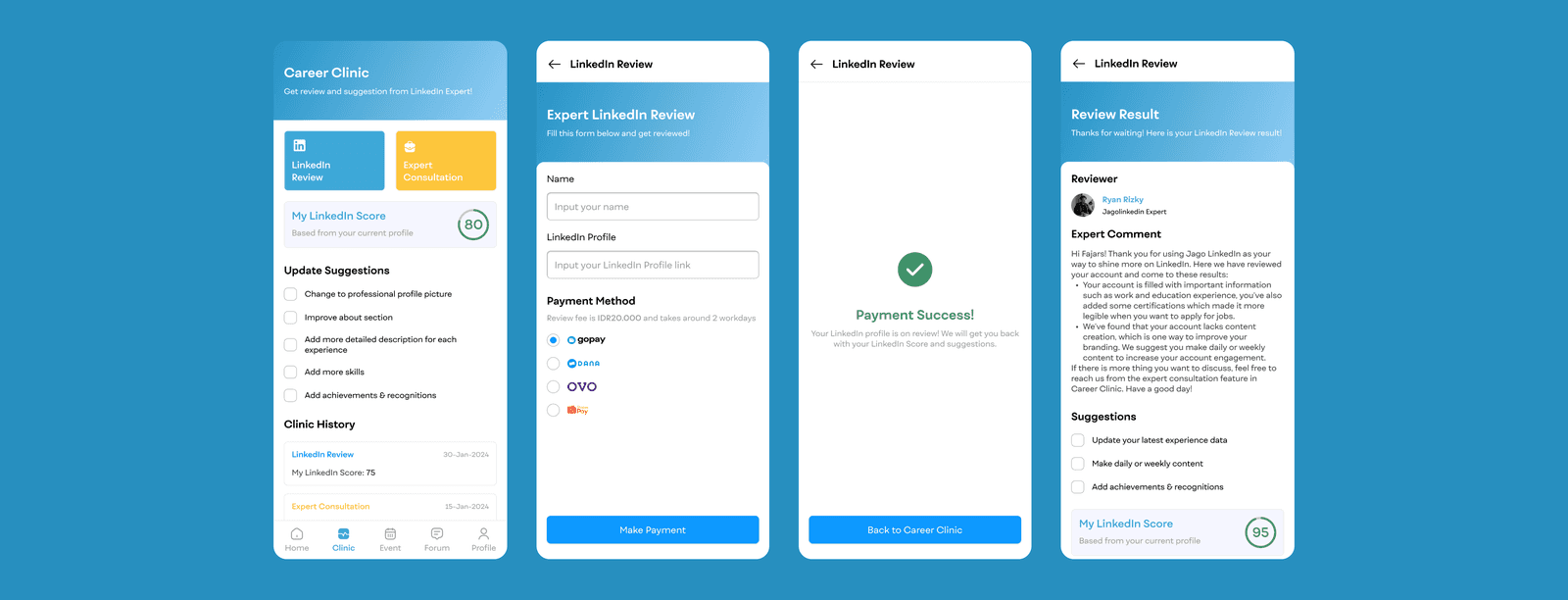

The concept of this feature is as a Jago LinkedIn service where users can review their LinkedIn accounts and then get comments, suggestions, and LinkedIn scores.
The flow is that users fill out a form with their name and LinkedIn profile link, then make a payment of IDR 20,000 for one review, and then wait about 2 working days to get the review results.
One of the reasons why this service is paid is to support the Jagolinkedin business side. This LinkedIn review scheme can be used as a business model as income from the application.
When the user has made a payment and the review is processed, the user can see the history but the status will show that the review is still being processed. When the review is complete, the user will get a notification and access the review results through the history section.
Suggestions from reviewers will automatically go to the Update Suggestions section on the Career Clinic page. The LinkedIn score will also be automatically updated.
Expert Consultation
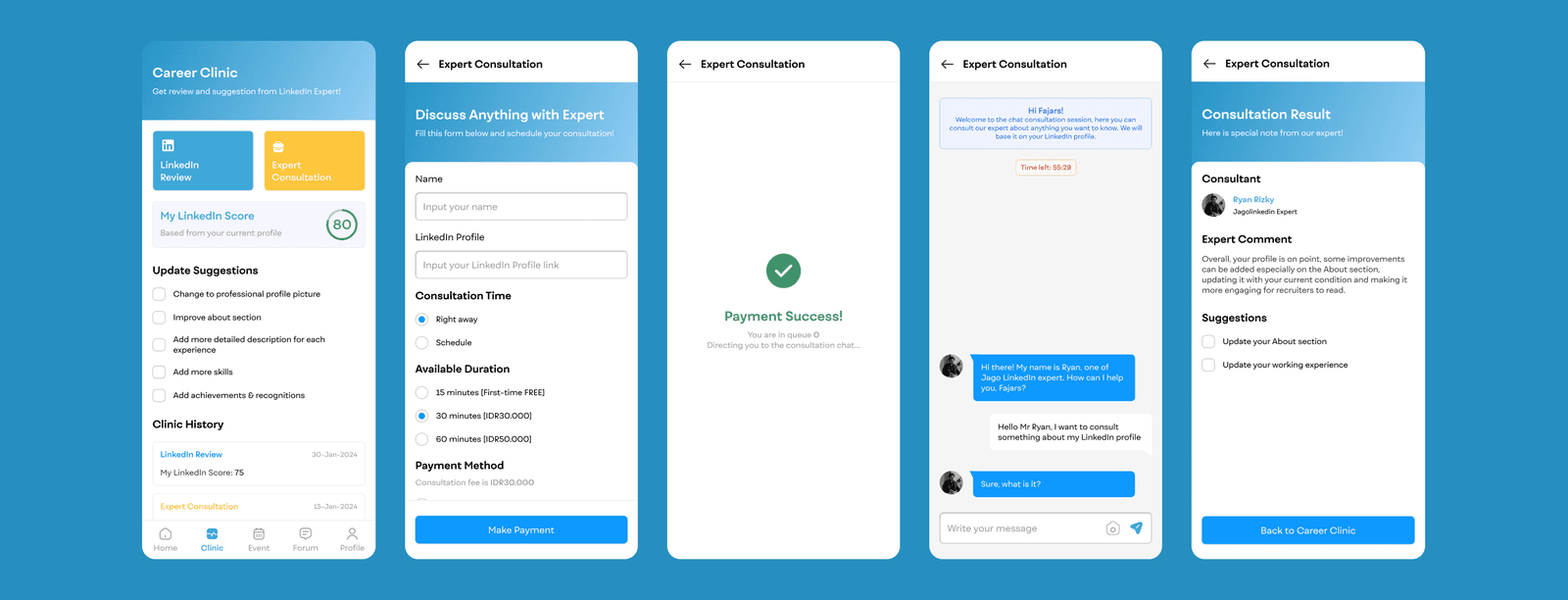

In addition to reviewing and getting comments on LinkedIn profiles, users can also consult with experts to discuss topics related to LinkedIn, personal branding, networking, etc.
The flow is that users fill in the name form and LinkedIn account link, choose whether the consultation will be done right away or scheduled for later, then choose the duration, pay the fee, wait in line (if any), and consult via chat with the expert.
This service is also paid according to the duration chosen, however, a free consultation promo can be added for new users. This way, users can try the features first and if interested, users can re-book a consultation anytime, anywhere.
If consulting for another time, users will be given a notification close to the selected time. If you want to consult right now, there may be a condition where there is a queue of several users so you need to wait first. After the consultation is complete, users will get comments and suggestions.
Prototype
Here is the clickable prototype for the mobile app design.
I tried to make a design that is as similar as possible to the services available at the Jago LinkedIn company. Every design decision I make is directed at whether the impact of the features I create can be in line with the goals and brand of Jagolinkedin.
In terms of visual appearance, I use the main colour of the Jago LinkedIn Instagram post style, only I choose a brighter colour to get a fun feel.
I hope that all the features can increase user engagement towards the Jago LinkedIn brand while making it one step closer to Jago LinkedIn’s goal of unlocking LinkedIn's potential for personal branding, networking, and career advancement.
Measurable Outcomes
Design is completed, next, I need to measure how the outcome and is it solves users' problems. I would like to conduct usability testing, but, due to time constraints, I did not have time to do it and also to measure the results of my design. However, it does not rule out the possibility that the solution I offer can be applied to the Jago LinkedIn application concept.
Limitations & Lesson Learned
Although I failed to join the Jago LinkedIn team because it turned out that the job vacancy was fake, I am grateful that I was able to complete a series of design processes in a relatively short time. Of course, there are still many shortcomings in this design, but I made this a major improvement for my next projects.
The things that can be done in the future as improvements to this project include conducting usability testing to validate my solution, conducting more exploration and ideation, testing various new solution concepts, and conducting more in-depth research to obtain more accurate data.