A web UI/UX Design for a startup that provide easy gardening services and connect people with gardeners.
CLIENT
Candidate College
ROLE
Head of Web Design
SERVICE
Product Design (Web App)
Project Details
Problem
The current OKE Garden business process all done using WhatsApp by the CRM and Operation team as the main platform to provide the service to customers. They want to automate this using their website so that the process can be simplified and easier for the user to also explore all the services and customize what they want easily. Thus, my project here is to create a new garden booking flow from the okegarden.com website based on the current business process.
Goals
Creating the new garden booking flow from the okegarden.com website.
Make a flow that is easy to understand and able to match users' behaviour when ordering a garden from OKE Garden.
Automate the current ordering flow to replace the old one that uses WhatsApp.
Role & Responsibility
My role here is as a UI/UX Designer on the Digital Product team. There is 1 design coordinator and 3 designers including me but in this project, only me and the design coordinator worked on this, so both of us did the work together along with the help of our product manager.
Constraints
This project was done in a timeline of around 6 months, it’s indeed a long time but the process is also deep, especially in the research and validation phase since our product manager encourages us to build the product based on real user data. There were no real constraints and setbacks, even though the team is just 2 people, but we can solve this problem together by regularly discussing with various stakeholders including C-levels, developers, and the customer relationship management division.
The project was completed with fully backed data dan validated from a real client and it’s on its way to be developed.
Design Process
The design process involves research, ideation, concept testing, creating low and high-fidelity designs, and validating solutions via usability testing, all done respectively to ensure the designer product will have valid data based on how the factual condition on the user side so that we can match it to create as easy as possible product.
Research
Since the problem already exists in the company, the C-levels want us to research it first to understand how it is the real situation that is happening. Here, we created a research plan to kickstart our process.
Background
The user is having difficulty understanding the flow of the garden booking and design service in the OKE Garden product. They encounter obstacles in navigating the user interface, a lack of clear instructions, and confusion about the sequence of steps to be taken. This leads to frustration and wasted time for users when trying to use the feature.
Stakeholders feel that there is a lack of automation in the garden booking and design service in the OKE Garden platform, which can hinder OKE Garden's ability to quickly meet user demands.
Objectives
The objective of this research is to cut down the consulting process with the operations team when users order a design/garden. Specifically, this research aims to:
Examine the potential changes in the ordering flow that can reduce the reliance on consulting with the Customer Relationship Management and Operations team.
Assess the effectiveness of automation solutions or feature development that can minimize the need for direct consultation with the operations team.
Research Question to Answer/Hypothesis
If the ordering flow is redesigned to provide clearer instructions and a more intuitive user interface, then users will be able to navigate the process more easily, and the need for consultation with the operations team will be reduced.
If automation solutions or feature developments are implemented to simplify the ordering process, then the reliance on direct consultation with the operations team will be minimized.
Proposed Methodology
The methodology employed in this study is the mental model approach. It aims to understand the cognitive frameworks, thought processes, and decision-making patterns of individuals. The research will specifically investigate participants' mental models using qualitative analysis techniques. The analysis will uncover insights into participants' beliefs, behaviour, assumptions, and knowledge about the topic, providing valuable information for enhancing user experiences and making informed decisions.
The specific methodology used is by researching how real clients interact with the CRM and Operation teams on WhatsApp, understanding what needs to be provided when there are clients, what to ask and tell, and finding issues in the process that can be improved.
Respondent Criteria
Age: Participants must be between the ages of 15 and 50 years old
Gender: Participants can be of any gender.
Behavior:
Users that have done a consultation and transaction with OKE Garden (client).
Operations team that handles users' needs in designing and building gardens.
Timeline
This is the timeline for the research:

Research Findings
For the research phase, I was given access to OKE Garden’s CRM WhatsApp account to research how the team interact with users and take notes on the pattern and the issues that are happening. When logged in to the account, I saw that there were so many chats about the business process, whether it was client chats, team chats, or chats with other company functions. I get the feeling that this should really overwhelming and their decision to try to automate this was the right one.

This is the preview of the chat screenshot that I took to document the process of how the ordering flow was done before. It usually starts from clients reaching out asking for the service based on their needs, then the team will try to offer them the matched services, and when it’s deal, that client will deposit payment and will be added to a certain group with other teams like project manager and operation team.
I was finally able to define this process by looking at hundreds of chats and understanding the pattern of interaction there. After that, I documented my findings and also noted some issues that happened between those processes.

One of the issues that I noticed often is that the credibility of the company sometimes is questioned by users. In this example, the user doesn’t want to make a deposit payment directly because the account number provided is not on the company name but is still individual. Here the user also asks for the company address to make sure that the company is real and not a fraud.

Another thing that I note is that the CRM team is always sending repetitive texts like price and service package messages over and over. While this can be easier done with the WhatsApp Business feature, it would be better if there is a dedicated place where users can look at that information easily before they ask.
To conclude the research phase, here are all the issues from what I gathered:
Credibility: The user does not believe and is hesitant to pay because the payment account does not use the company name.
Uncertainty regarding the estimated cost of creating a garden: The user wants to know the estimated cost that needs to be incurred to create a garden of a specific size.
The need for inspiration: The user has land but has no inspiration on what kind of garden they want to make.
Adjustment according to user budget: The user wants to know whether the garden can be made according to their budget.
Looking for promotion: The user wants to know whether there is a promo for their transaction.
Service customization: The user wants to know whether the service can be customized. The user wants to use the service just to plant a tree, not to build a garden.
Previous Ordering Process Flow
I mapped out all the research insight into one single flow that tells all the step-by-step ordering process. Here I get the pattern of the previous ordering flow and define it as a user flow with each step having its real condition on WhatsApp chat as proof. You can view the full version of the flow in this link.
Note that this flow only covers the overall steps of the process, other process that happening behind the interaction of users and CRM is not included since it contains private business information. Anyway, this flow is the one that I will be referencing when designing the new ordering flow for the website.

First User Flow Draft
From the previous order flow on WhatsApp, I tried to ideate the first draft of the new user flow that will be implemented on the website.

There are two flows here because it will have two places from where users can enter the new ordering flow; from the Ensiklopedia feature in which users can look through garden inspiration and proceed to build their garden from there, and one from the Custom Desain button from the home page. The difference is whether the users should look for the inspiration first or look later after entering the flow.
Here I also have a sketch of the main information about the garden inspiration like the category, land size, plants, materials, and prices.
Rough Low-Fidelity Design
From the first draft of the user flow, we started to create a rough low-fidelity design to imagine how each step would look on the website. This was done while we were discussing with other stakeholders like the product managers and C-levels so that they could understand the basic concept before we went too far on the design process.
Here I will just showcase the low-fidelity design and will get more detailed later in the final design section.


Concept Testing with Stakeholder
After being done with the user flow and the low-fidelity design, we started to talk with stakeholders to do concept testing before moving forward. We met with the product manager and Operations team about the flow and asked about things that we’re still confused about and not clear enough. The meeting was sufficient and we got some feedback to revise the user flow.
Revised User Flow
The previous user flow was revised based on the meeting with stakeholders, you can see the pdf file here. In this new user flow, the flow only starts from one place which is from the Order Now button on the home page, this is for simplicity and makes it clear for the users regarding how to order garden right away.
In this flow, the end condition is that after users pay the deposit, they will directly generate a WhatsApp group that they can join. This cut all the consultation with CRM and changed it using a website flow. All the main checkpoints from the old flow in WhatsApp are still there but improved and simplified. This way, users can just follow the instructions on the website, pay the deposit, and generate a WhatsApp group with other parties involved to work on the garden.

Usability Testing
After revising the user flow, we also revised the low-fidelity design and decided to conduct a usability testing session with 5 testers. This was done using Maze and the session is moderated via Zoom Meeting or by person. We split the testing so each of us will look for 2 testers each. The testing scheme was to let users try the new order flow from beginning to end, and then after that, we discussed in more detail what needed to be improved and what was already good.
Usability Testing Results
We gain both quantitative and qualitative data by using Maze and directly asking users’ feedback, but here we have converted all data into an affinity diagram based on every category that users experience when completing the tasks. We were not focusing on quantitative numbers because we’re in need of improvement so qualitative data will be more helpful to analyse. Here is the pdf file of the affinity diagram.

We got a lot of feedback from various categories, this sure is good because we’re currently testing in the low-fidelity stage so we can move on better based on these data. The data here is organised based on each page so we will know what to improve at what page.
Iteration Ideas
From the testing data, we tried to solve all the issues using the How Might We method where we brainstormed each problem and voted a solution. The red square note is the issues, the grey square note is out How Might We, and the circle shape is our solutions, the one with the most thumbs is the one we agree on. Here is the pdf file.

Final Design
After generating iteration ideas, here we proceed on the high-fidelity design based on the data we gain and information discussed with stakeholders. Here I will explain in more detail the fixed flow and how each page functions along with the reason behind every design decision.
Customer Journey Page
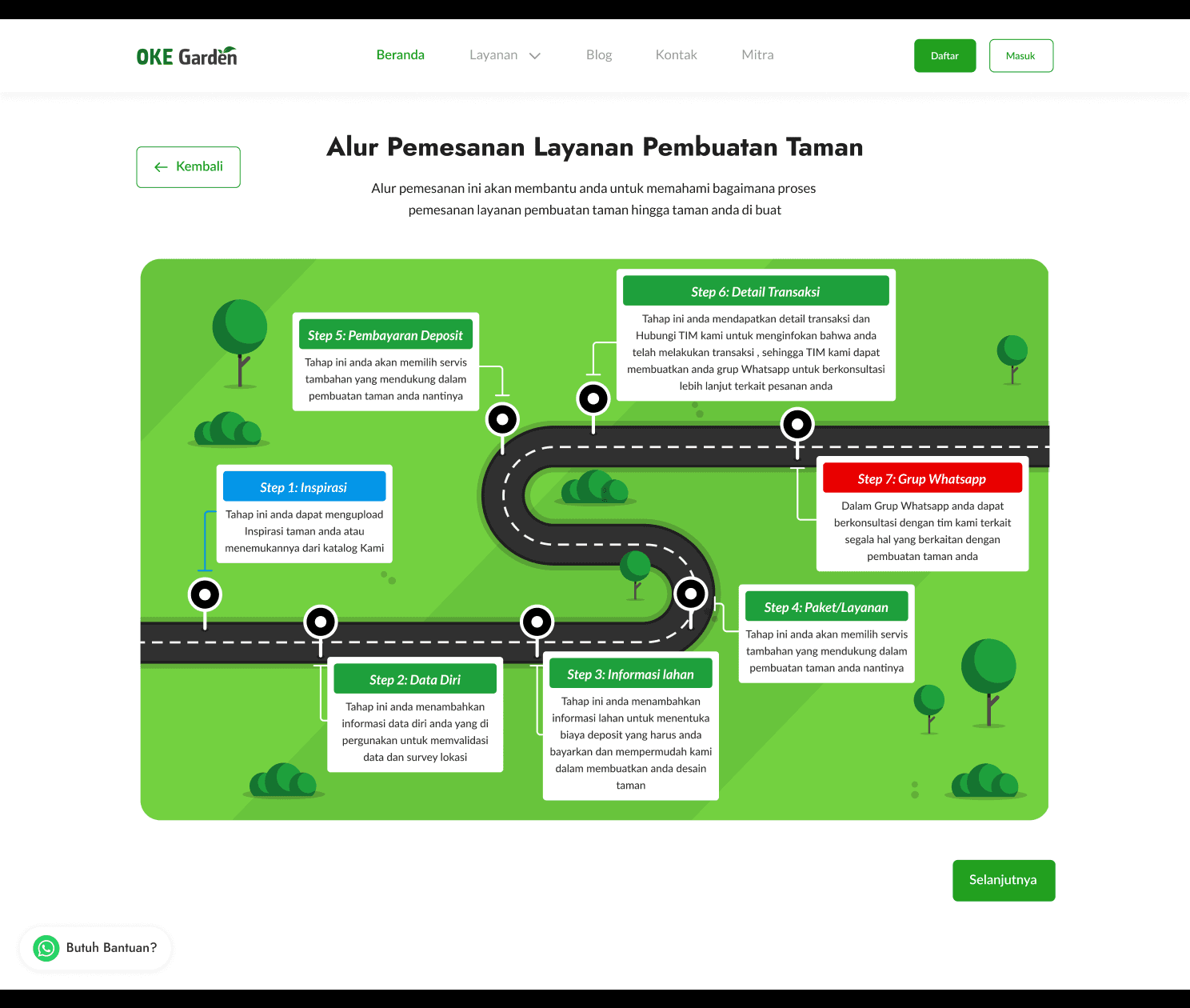
Same as in the previous flow when using WhatsApp, the first step is to let the users know the customer journey or what steps they will take to complete the garden order. Here is just the same, this customer journey page explains a detailed step on how to order at OKE Garden, also showing all the pages that users will need to pass to proceed. The steps are:
Choose inspiration
Fill personal data
Fill land information
Choose service package
Deposit payment
View transaction detail
Join WhatsApp group
The design here is created as a road with each point to make it easier to understand for users to follow the journey. The illustration here uses a green scheme that matches the OKE Garden brand. For the page itself, we designed it in Indonesian, with a layout like a form flow, so when users click on next, it will take them to a similar page that resembles a flow. There is also a floating WhatsApp button just in case users are confused and want to ask directly to the team via WhatsApp.

Upload Inspiration Page
The next step is we prompt users with questions whether they already have a garden inspiration or not. When users already have inspiration, they can choose Upload Inspiration and submit their reference there, this can be a garden image, garden design in 2D or 3D, or more that is related to the kind of garden they want to build. When users don’t have the inspiration, they can look through the OKE Garden inspiration list on the Ensiklopedia feature and start from there by clicking on the Find Inspiration button.
Why we ask about this in the front because we want to make it easier for users if they already have inspiration so they don’t have to look manually at what OKE Garden have but still provide an option for users who want to look on OKE Garden inspiration reference.
This page is the start of the garden ordering flow and we added a progress step on the top of the page which consists of Inspiration, Personal data, Land information, Service package, and Payment. This is to let users that the flow won’t take long and just in a simple 5 steps.

When users already have inspiration, they can upload it on this page whether it’s via links, pictures, videos, and giving a note about what they have in mind. Then they can click on next and it will take them directly to fill out personal data.

Garden Inspiration Page
If users choose that they don’t have garden inspiration, they can search for references in the Ensiklopedia feature that has many garden design inspirations that can be made by OKE Garden, many kinds of gardens can be searched and filtered at wish.
The service provided by OKE Garden itself is not just about creating a garden in a dedicated garden space, users can also choose any reference to build their desired garden based on their needs, no matter if their land or space is the same as in reference or not, that can be customized later.

On this page, there is also a tab specifically dedicated to highlighting a new kind of garden inspiration, in this case, the bee-friendly garden which includes non-sting bees and their houses.

Another tab is a page that explains every garden theme available, such as bee-friendly garden, tropical garden, minimalist garden, and dry garden. Users can choose each theme and it will take them to the Ensiklopedia page which is filtered based on their theme choice. There is also a feature to compare themes, so when users are confused about what to choose, they can have some information regarding the advantages and disadvantages of each theme.

Inspiration Detail Page
When clicking on each inspiration card, it will take users to the respective inspiration detail page which has all the information of the inspiration like images, description, build price, maintenance guide, size, and more. Users can share the inspiration with others and can click on Make Inspiration to continue in the ordering flow.

Register Page
Up until this point, users can explore the website without login, but after choosing or uploading inspiration, they will need to log in because the next step requires them to enter personal data.
For most of the design, we implemented guidelines from the design system that was already established before. The login and register page is one of the designs that was already made by the previous designer so we just used it and polished it a bit.


Personal Data Input Page
After logging in, users will need to fill out their personal information. Data that was previously already collected when registering like full name and WhatsApp number will automatically be filled in so users just need to fill in the remaining form like location and address.

Land Size Input Page
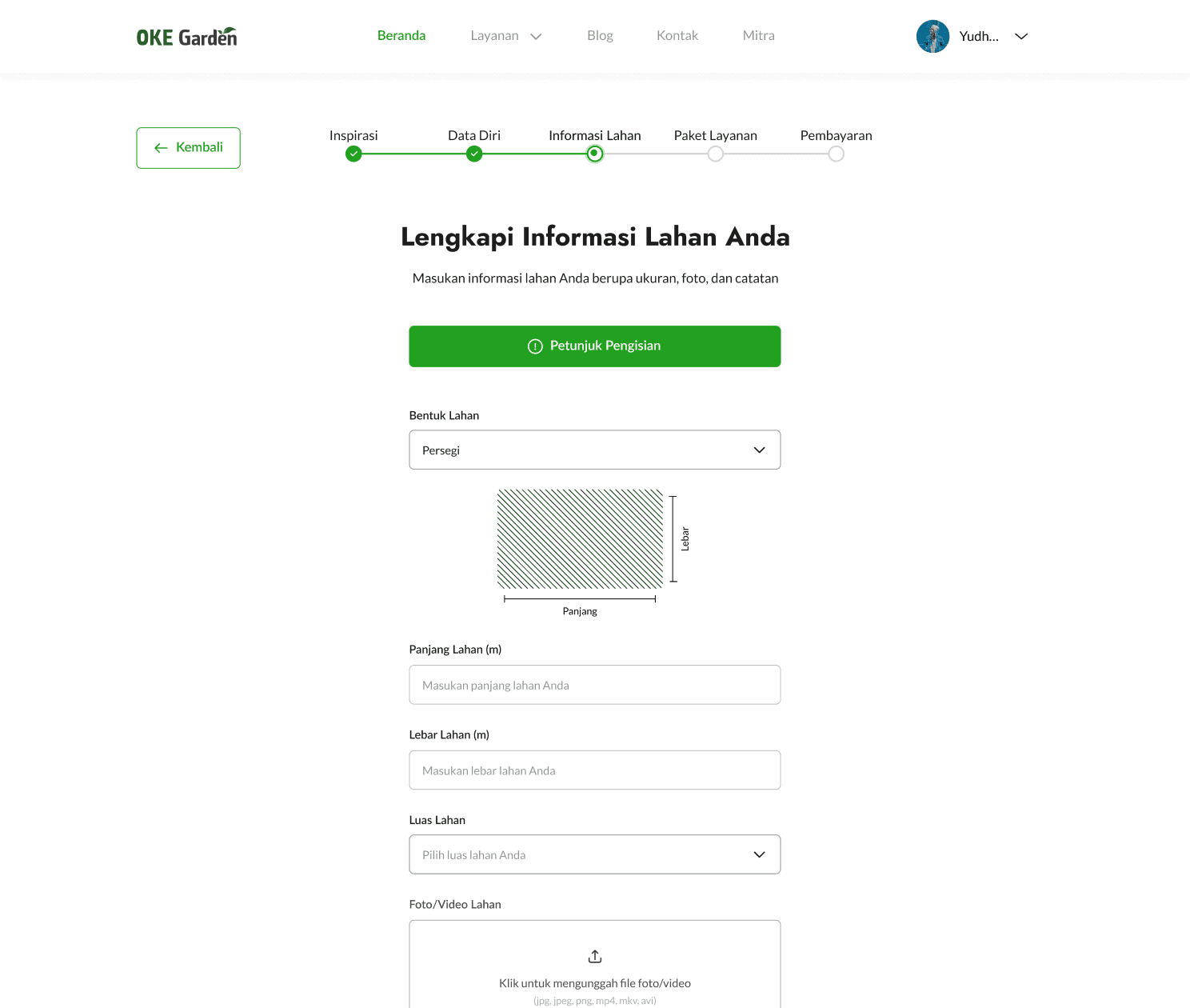
Users then need to fill out information about their land size that will create a garden. Here, they can first choose their land size whether it’s square, trapezoid, or irregular and then fill each side of the land side in meters. They will also need to choose the land wide, upload some photos and videos, and give notes about how they envisioned the garden would be.
This page is one of the pages that have a few rounds of exploration since it’s quite hard to find the perfect solution to ask users about their garden shape and size because each person could have a very unique land size. The final decision to make a dropdown and provide a land shape illustration is because it’s much easier for users to understand when they can imagine what it’s needed that they need to provide like each land side size and overall wide. The illustration will change based on what shape users choose.
There is also a button to read the guide on how to fill out this form. When clicked, it will show a modal that explains each point of the form like they need to choose garden shape first, then enter their land side size, and so on.

Service Package Page
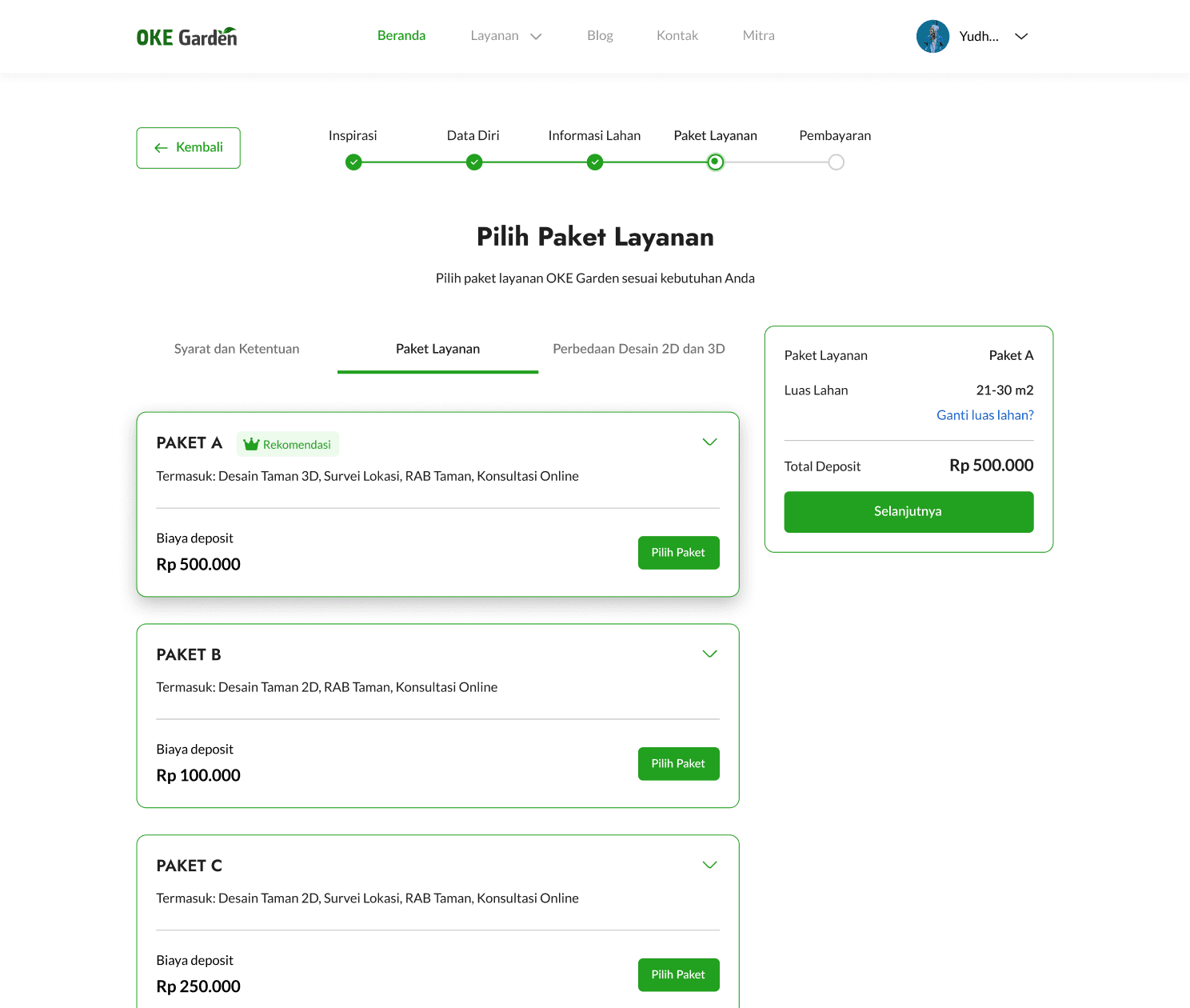
After filling out all the information needed, they will taken to this service package page. The land wide that users choose on the dropdown in the previous page will be used as a base price of the service package. For example, when users choose that their land is under 10 m2, the package price will differ from when they choose another landwide like 21 - 30 m2. OKE Garden did have different pricing for different land wide since it will require more resources to design and build gardens of different sizes.
When entering this page, they will be shown in the Terms and Conditions tab because this information is important that we make sure users understand this before proceeding forward.

This is an example of when the land wide size is different from before, in this case, is <10 m2:

OKE Garden offer 3 service packages which have their features such as whether the design will be created in 2D or 3D and whether there will be a location survey or not. Every price shown here is the deposit price, meaning that after paying this, users will be proceeded depends on the package feature that they chose, and after it’s complete, they have the option to continue to build the garden (not just the design) or cancel and take back their deposit money.
On the design side, the pricing card here is designed as a horizontal card with an option to expand and collapse it. When expanded, the package feature will be explained in more detail just in case users want to know more about each feature. Anyway, why was the pricing page located on the last page of the flow we want to trigger the sunk cost effect on the users. This means that we want users to think that they have come all the way here, from finding inspirations, filling in data, and choosing packages, it will be wasted when they just change their mind on the last step. We want to trigger that kind of thinking in the users' minds so they will likely proceed to pay the deposit.

There is also one other tab here which contains information about the difference between 2D and 3D garden design along with their plus and minus as a reference for users who are still don’t know and confused.

Payment Detail Page
Users then will be taken to this payment detail page which shows the order summary and has an option to apply a discount code. After everything is set up, they can click on Continue to Payment to complete their order.

OKE Garden use Xendit as its payment gateway so the payment page will lead here and users can choose which method they will use to pay.


Customer Dashboard Page
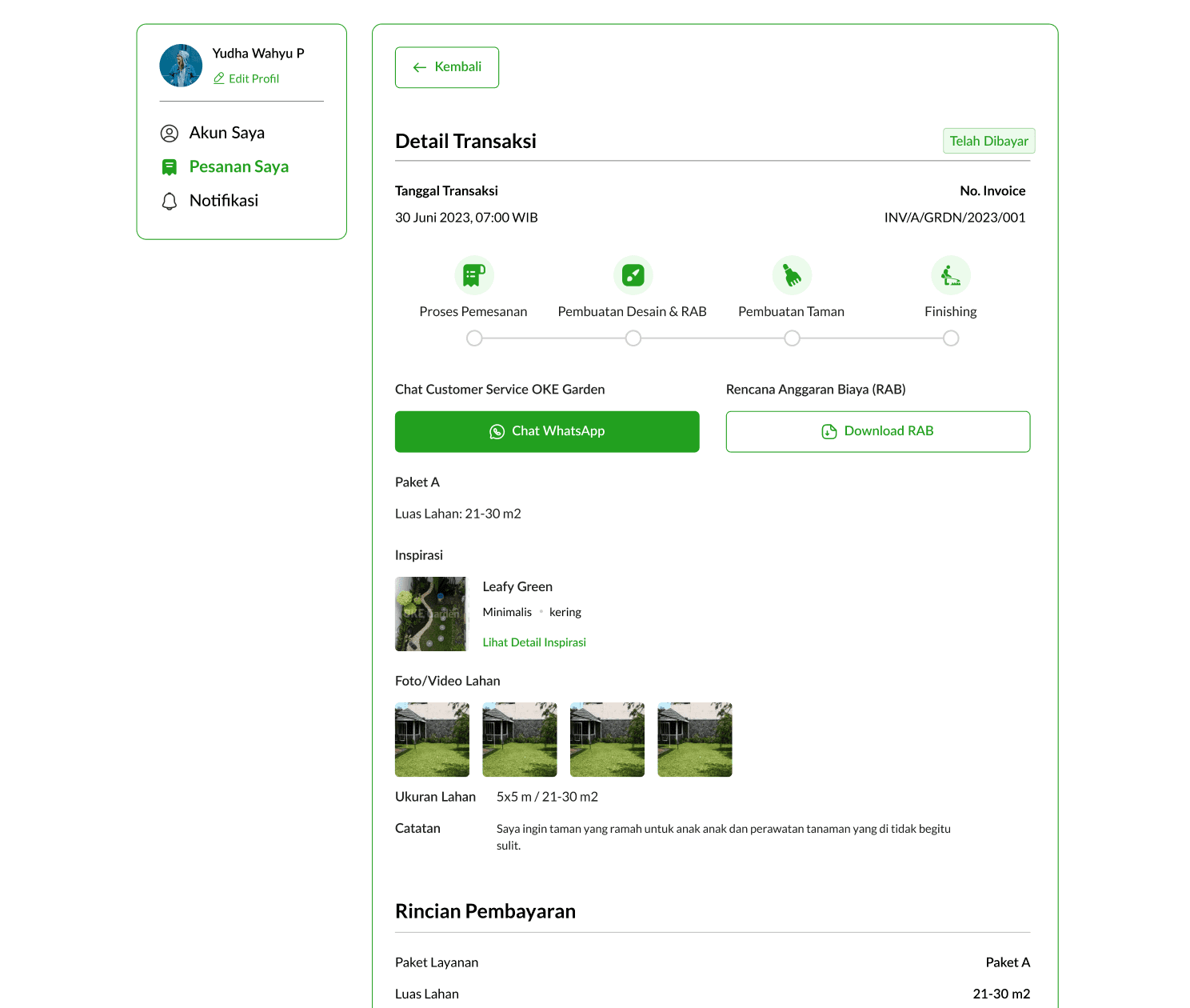
After completing the deposit payment, users will be taken to the customer dashboard page which shows their transaction details and what is the next step in their ordering process. Here is shown the current step in the ordering process along with an option to chat with customer service via WhatsApp and download their garden budget plan. This page will be updated regularly when each step has passed and when everything is done, users can see their garden design and choose whether to continue to build the garden or not. If yes, the remaining process will still be done via WhatsApp group because it will involve various parties in the process. If not, they will have an option to get back their deposit fee. Hence, this step is the end of the website ordering flow.

On the customer dashboard, there is also an option to change personal information like name, contact, and location/address along with changing account password.

The garden order flow from using the OKE Garden website concluded here. As stated before, the next step will be done via WhatsApp group, even so, we have tried to automate the consulting and data input process on ordering a garden until payment so that later the Operations team just need to check out the data on the admin side of the web and are ready to proceed forward without having to asks users manually, but if they still prefer that, we provide the option to do consultation via WhatsApp.
Measurable Outcomes
After the high-fidelity design was done, we set up another usability test but only with real past clients, we used moderated testing sessions using Maze and still focused on qualitative data regarding how they enjoyed our new design. Since the data gathered was more qualitative, the results were good and our tester perceived the new flow with a positive reaction. There is also some feedback here and there but since our design time is up, we decided to just take note of the feedback for now and proceed with this project to development.
Limitations & Lesson Learned
This project is sure to take a long process and we have to go through it here and there and talk with people several times to make sure that our design can meet the project objective and the acceptance criteria. I’m so proud that I participated in the project and had an impact on the company's goals, I learnt a lot from my team, the stakeholders, and other parties involved. Our design process is solid already but if given more time, I would want to iterate more on the final design to achieve a better experience for users, overall, this project is a big success for my team to be able to complete it with a marvellous process and amazing results.